

Introduction
Meta has finally entered the AI image generation race with its own in-house model, and it’s not holding back. Muse Image, the first media generation model built by Meta Superintelligence Labs (MSL), rolled out this week across the Meta AI app, meta.ai, Instagram Stories, and WhatsApp – and it’s already being compared directly to OpenAI’s GPT Image and Google’s Gemini native image tools.
For Indian users, this matters more than it might first seem. Meta AI already has a massive user base across WhatsApp and Instagram in India, and Muse Image is designed to slot right into those apps rather than live as a separate product you have to go hunt down. Whether you’re a casual user who wants to turn a selfie into a movie poster, a small business owner exploring AI-generated product visuals, or a content creator looking for a faster way to make Instagram Stories effects, Muse Image is likely to show up in your feed sooner rather than later.
What is Muse Image?
Muse Image is Meta’s first proprietary image generation model, developed by Meta Superintelligence Labs — the research division led by Alexandr Wang that also built Muse Spark, the large language model Meta unveiled earlier this year as a successor to its Llama family. <cite index=”15-1″>Muse Image marks the second major release from this team, and was reportedly codenamed “Mango” internally.</cite>
Unlike a typical text-to-image tool, Meta doesn’t position Muse Image as a simple prompt box. <cite index=”1-1″>The company describes it as its most advanced image generation model yet — one that follows instructions faithfully, edits with precision, composes images from multiple reference photos, and can even draw on Instagram for social context.</cite> It’s built to work conversationally, remembering what you asked for earlier in a chat so you can keep refining an image rather than starting from scratch every time.
<cite index=”1-1″>The model also brings agentic tool-use capabilities to image generation and integrates with Muse Spark</cite>, meaning the two models can share tools and plan jointly for more complex, multi-step creative tasks — think animated GIFs, mini websites with embedded generated images, or interactive visual mockups, not just static pictures.
Where you can use it right now
<cite index=”1-1″>Muse Image is available today in the Meta AI app, on meta.ai, in Instagram Stories in the US, and in WhatsApp in a limited set of countries, with a Facebook rollout coming soon.</cite> <cite index=”16-1″>The model is being introduced to users in select countries and is expected to expand to more regions and more Meta apps over time.</cite> If you’re in India, you may not see the full feature set on day one — but given how central WhatsApp and Instagram are to Meta’s India strategy, a broader rollout here is very likely in the coming months. We’ll keep this section updated as availability changes.
Key Features of Muse Image
Muse Image isn’t just “another AI image generator” — Meta has packed in a handful of features that genuinely separate it from the pack of text-to-image tools most people have already tried.
1. Agentic, not just generative. Instead of mapping a prompt directly to pixels in one shot, <cite index=”6-1″>Muse Image operates as an agent: it invokes search and coding tools to improve accuracy, self-refines its own generations, and improves through scaling test-time compute.</cite> In plain terms, it doesn’t just guess — it checks its own work and fixes mistakes before showing you the final result.
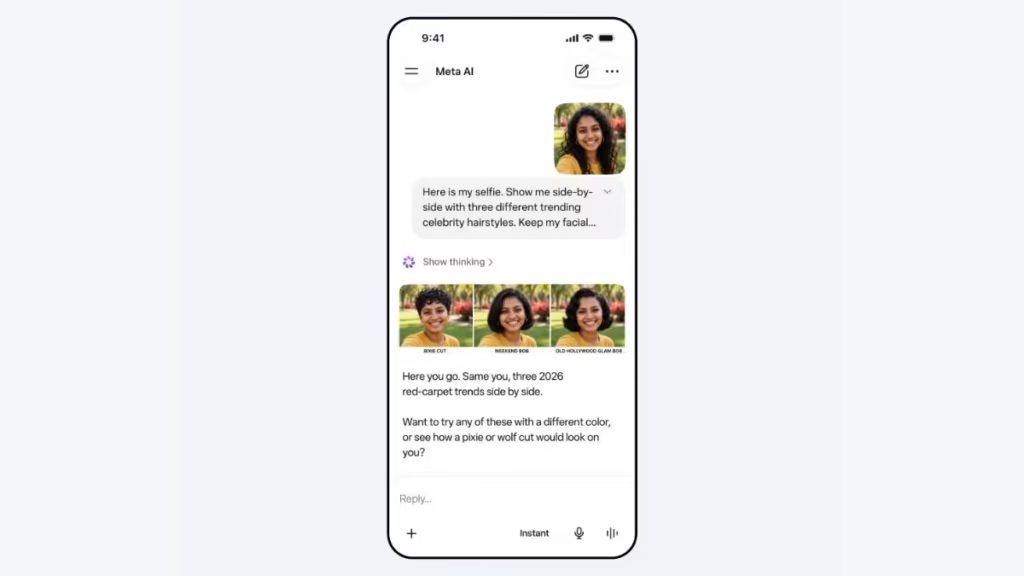
2. Multi-reference composition. You can feed it several photos at once and ask it to blend them into a single coherent scene — useful for things like putting two people from different photos into the same picture, or combining a product shot with a background reference.
3. Sketch-and-annotate editing. <cite index=”10-1″>You can draw or write directly on a photo to indicate exactly what you want changed, rather than trying to describe every edit in words.</cite> This is a big usability upgrade over prompt-only editing, especially for people who find it hard to describe visual changes precisely.
4. Instagram-aware personalization. <cite index=”10-1″>Tagging a friend’s Instagram account can incorporate their likeness into a generated image, using the same reuse controls people already have in place for how their photos appear on Instagram.</cite>
5. Legible, accurate text and QR codes in images. <cite index=”10-1″>Meta says Muse Image can be prompted to generate a functional QR code, and that the text it produces inside images comes out legible and styled to match the scene.</cite> This has historically been a weak spot for AI image generators, so it’s a notable claim.
6. Web-search-grounded accuracy. <cite index=”6-1″>Muse Image learns to search the web to ground generated images in factual, real-time information and visual references, which improves accuracy on knowledge-heavy prompts — things involving current events or real-world facts and figures.</cite>
7. Content Seal watermarking. <cite index=”1-1″>Every image made with Muse Image in the Meta AI app and on meta.ai carries a hidden, invisible provenance watermark called Content Seal, designed to survive cropping, compression, resizing, and even screenshots.</cite> <cite index=”1-1″>Meta is also previewing a detection tool that lets anyone check whether an image carries this watermark, and plans to extend the system to video as well.</cite>
8. Advertiser and business tools. <cite index=”3-1″>Advertisers and agencies will soon be able to use Muse Image through Advantage+, Meta’s AI-powered ad tool, to generate and vary image-based ad creative.</cite>
Muse Image Feature Snapshot
| Feature | What It Does |
|---|---|
| Agentic self-refinement | Reviews and corrects its own output mid-generation |
| Multi-image composition | Blends several reference photos into one scene |
| Sketch/annotation editing | Draw on a photo to direct specific edits |
| Instagram context | Tag accounts to include a person’s likeness (with reuse controls) |
| Web search grounding | Pulls real-world facts/visuals for knowledge-based prompts |
| Code execution | Writes and runs code to render accurate charts and QR codes |
| Content Seal | Invisible, tamper-resistant AI watermark |
| Ad tool integration | Powers creative variation inside Meta’s Advantage+ |
How Muse Image Works
Here’s where Muse Image genuinely departs from the “type a prompt, get a picture” model most people are used to.
Step 1: Understanding the request. When you send a prompt – text, an uploaded photo, a sketch, or a combination – Muse Image first interprets the intent using reasoning capabilities shared with Muse Spark, Meta’s large language model.
Step 2: Tool use during generation. <cite index=”1-1″>During training, Muse Image learned to write and execute code that produces accurate plots and QR codes, and to condition on rendered figures to improve the accuracy of what it generates.</cite> This means for a request like “show me a bar chart of X,” it isn’t hallucinating a chart that merely looks plausible — it’s actually generating and checking real chart data through code before rendering the final image.
Step 3: Grounding with web search. <cite index=”1-1″>For prompts involving real-world or current-event information, Muse Image searches the web to ground its output in facts and visual references, rather than relying purely on what it learned during training.</cite> Independent testing has backed this up in practice — <cite index=”17-1″>one Indian publication tested Muse Image with a prompt asking for a bar chart of India’s smartphone market share by brand for Q1 2026, and the model returned figures that matched IDC’s actual reported numbers down to the percentage point.</cite>
Step 4: Self-refinement. <cite index=”1-1″>Muse Image reflects on and improves its own work within its chain of thought.</cite> <cite index=”6-1″>This self-correction can take a few different forms — a small local edit when one detail is off, a full regeneration when larger parts of the image are wrong, or a different corrective path depending on the type of mistake.</cite> That said, this isn’t flawless: the same India-based testing found <cite index=”17-1″>that in a multi-constraint prompt (correct headcount, an exact clock time, and an exact candle count on a cake), the model got the people count and the clock right but overshot the candle count</cite> — a useful reminder that “agentic” doesn’t mean “perfect.”
Step 5: Delivering the final image (with a hidden watermark). Once Muse Image is satisfied with the result, it renders the final image and embeds the Content Seal watermark before showing it to you — all of this typically happens within seconds, even though multiple reasoning and tool-use steps are happening behind the scenes.
Muse Image Interface: What Using It Actually Feels Like
Muse Image doesn’t ask you to learn a new app. Instead, it lives inside apps most Indian users already open dozens of times a day.
Inside the Meta AI app / meta.ai: You type a prompt in a normal chat box, just like talking to any chatbot. You can attach one or more photos, and Muse Image treats the conversation as ongoing context — so a follow-up like “make the background darker” or “swap the shirt for blue” applies to the image you just made, not a fresh generation from zero. <cite index=”16-1″>The system retains memory of each conversation for iterative modifications, and you can mark up or amend images directly rather than typing everything out.</cite> <cite index=”10-1″>There’s also an “Ideas” tab in the image editor you can use as a jumping-off point for further tweaks, alongside a set of preset prompts if you’re not sure where to start.</cite>
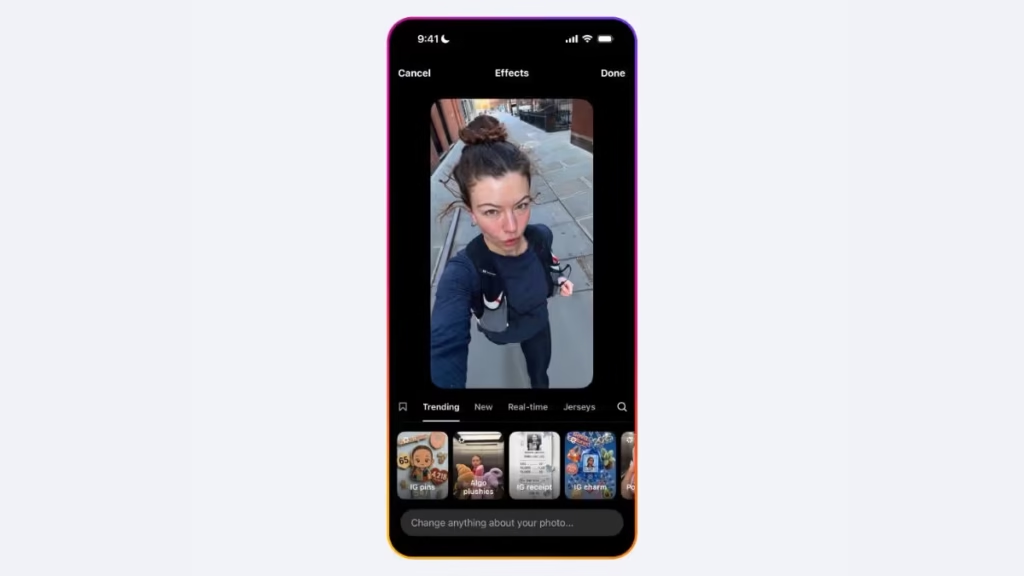
Inside Instagram Stories: <cite index=”9-1″>Muse Image powers more than 30 new AI effects for Instagram Stories</cite>, so here it shows up less like a chat and more like a filter — pick an effect, and Muse Image reworks your photo behind the scenes.
Inside WhatsApp: <cite index=”9-1″>In direct chats with Meta AI on WhatsApp, you can generate images conversationally, starting in select countries</cite> — which for many Indian users will be the most familiar entry point, since WhatsApp is already the default messaging app for a huge share of the population.
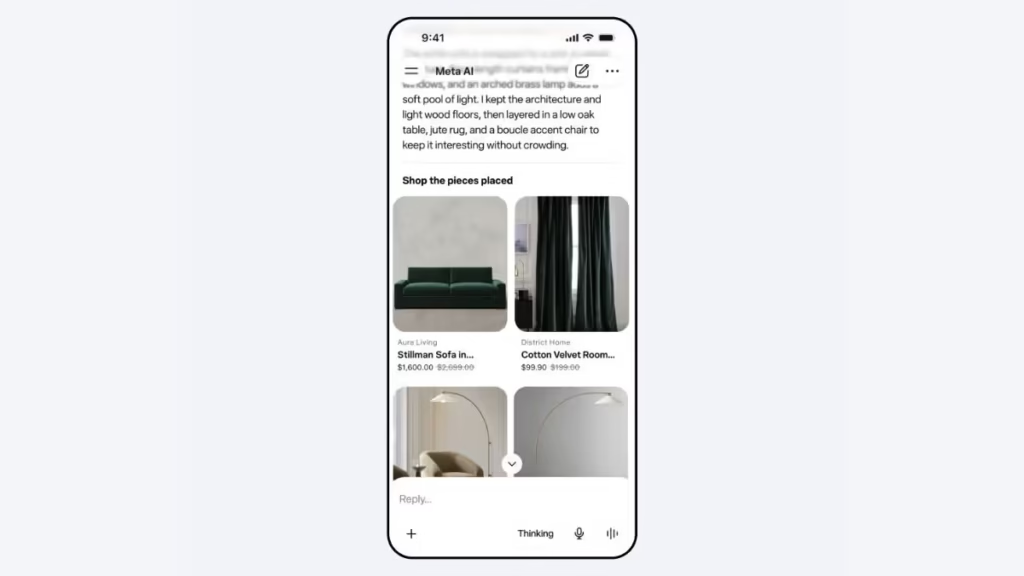
A shopping-specific mode: <cite index=”28-1″>One neat integration worth calling out is with Facebook Marketplace — you can use Muse Image to visualize how a used item, like a couch, would look in your own space before you buy it.</cite> This is a genuinely practical use case rather than just a novelty.
Also Read: Jio Call Agent and AI-Powered MyJio App Announced: Everything You Need to Know
Muse Image Pricing
Here’s the good news for most casual users: <cite index=”20-1″>Muse Image is free right now through the Meta AI app and website, WhatsApp direct messages, and Instagram Stories, with Facebook and Messenger support coming later this year.</cite>
<cite index=”20-1″>Free users get a set number of generations before hitting a limit. Once someone hits that limit, they can either wait for it to reset or subscribe to one of Meta’s Meta One subscription plans, which started in May at $7.99 a month.</cite> <cite index=”25-1″>Meta hasn’t published exact numbers publicly, saying limits can vary depending on factors like which app you’re using it from and your location.</cite> <cite index=”20-1″>The paid Meta One tiers unlock higher generation volume and more advanced editing tools for people who create images regularly.</cite>
For India specifically, Meta hasn’t yet announced localized INR pricing for Meta One at the time of writing — expect this section to be updated once regional pricing is confirmed. If you’re a creator or small business relying on Muse Image daily, budgeting for a paid tier is worth considering once free limits become a bottleneck.
Muse Image Pricing at a Glance
| Tier | Cost | What You Get |
|---|---|---|
| Free | ₹0 | Set number of generations/month across Meta AI, WhatsApp, Instagram Stories |
| Meta One (paid) | From $7.99/month (India pricing TBA) | Higher generation volume, advanced editing tools |
| Advantage+ (advertisers) | Business pricing via Meta Ads | AI-generated ad creative variations at scale |
Muse Image vs. Competitors: How Does It Really Compare?
Meta didn’t shy away from publishing its own benchmark comparisons, and the results are a mixed bag rather than a clean win.
<cite index=”20-1″>By Meta’s own account, Muse Image trails OpenAI’s newest GPT Image 2 model overall, but it beats Google’s Nano Banana 2 — the follow-up to the Nano Banana model that became a genuine consumer hit last year — specifically on tasks involving editing one or multiple images.</cite>
Independent hands-on testing paints a similarly nuanced picture. <cite index=”17-1″>One test found Muse Image’s QR code generation held up well, producing a scannable, structurally correct code embedded naturally in an illustrated scene, and its data-grounded chart generation was verified as accurate against real IDC market-share figures.</cite> <cite index=”17-1″>However, the same testing found the model struggled with precise counts in complex, multi-constraint scenes — getting a person count and a clock time correct in one test, but overshooting the requested number of candles on a cake.</cite>
Muse Image vs. Gemini (Nano Banana 2) vs. GPT Image 2
| Muse Image | Nano Banana 2 (Google) | GPT Image 2 (OpenAI) | |
|---|---|---|---|
| Best at | Editing tasks (per Meta benchmarks), QR codes, chart accuracy | Broad consumer popularity, strong general quality | Overall top performer per Meta’s own benchmarks |
| Weak spot | Precise multi-object counts in complex scenes | — | — |
| Native app integration | Meta AI, WhatsApp, Instagram, Facebook (soon) | Google apps/Gemini app | ChatGPT app/API |
| Free tier | Yes, with limits | Yes, with limits | Limited/paid |
| Agentic self-correction | Yes (search + code tools) | Not publicly emphasized in same way | Not publicly emphasized in same way |
| Social/Instagram context | Yes — can tag accounts | No | No |
The practical takeaway: if you’re already living inside WhatsApp and Instagram, Muse Image’s biggest advantage isn’t necessarily raw image quality — it’s that it’s already where you are, it’s free to start, and it’s genuinely useful for grounded, factual, or QR-code-heavy tasks that other tools still fumble.
Real-World Use Cases for Muse Image
For everyday users: Turning selfies into stylized art, redecorating a room virtually before buying furniture, creating festival greetings (Diwali, Holi, Eid) with personalized text, or building fun Instagram Story effects with friends tagged in.
For small businesses and D2C sellers: <cite index=”8-1″>Generating product visuals in premium settings and quickly producing marketing images without hiring a photographer for every SKU</cite> — genuinely useful for sellers on Instagram Shops, WhatsApp Business, or their own e-commerce sites who need fast, consistent creative.
For advertisers and agencies: <cite index=”15-1″>Muse Image powers ad creative variation inside Advantage+, letting brands adjust elements, swap styles, and generate on-brand variants of existing ad creative with fewer manual iterations.</cite>
For content creators: Quick concept art, thumbnail ideas, and QR-code-embedded promotional graphics that actually scan correctly — a small but meaningful upgrade over older tools where QR codes often came out broken or fake-looking.
For shoppers: <cite index=”28-1″>Visualizing a used item from Facebook Marketplace, like a couch or table, in your own space before deciding to buy it.</cite>
For data-driven content (like tech and business publishing): Because the model grounds numeric and factual prompts through web search and code execution, it’s genuinely usable for things like quick explainer charts — though always worth double-checking figures before publishing, since agentic doesn’t mean error-proof.
Tips for Getting the Best Results
- Be specific about constraints, not just aesthetics. If a count, exact time, or precise label matters, say so explicitly and ask the model to double-check it.
- Use follow-up prompts instead of starting over. Since Muse Image remembers the conversation, iterate (“now make it warmer,” “remove the object on the left”) rather than rewriting the whole prompt each time.
- Try the sketch/annotate feature for edits. It’s faster and more accurate than describing a spatial change in words.
- Lean on web-search grounding for factual content. Prompts referencing real data, current events, or specific real-world figures tend to be more reliable than purely imaginative ones.
- Tag responsibly. If you’re including someone else’s likeness via an Instagram tag, be mindful of consent — Meta provides opt-out controls, and it’s good practice to respect them.
- Check the Content Seal if you’re unsure about an image’s origin. Meta’s preview detection tool can confirm whether an image was made with Muse Image.
What’s Next for Muse Image
Meta has been clear that this launch is just the starting point. <cite index=”16-1″>The company intends to broaden availability to additional countries and bring Muse Image to Facebook and Messenger.</cite> <cite index=”1-1″>Content Seal watermarking is also planned to extend to video, alongside the ongoing rollout of Muse Video, which is built on the same pretraining base as Muse Image and adds native audio support.</cite>
<cite index=”20-1″>Muse Image follows Meta’s acquisition of the AI-only social network Moltbook by just a few months, and arrives as Meta continues building a large-scale AI data center it’s counting on to stay competitive in the race toward more advanced AI through 2030</cite> — so expect fast iteration, more benchmark updates, and closer competition with Google and OpenAI’s image tools over the coming months. For India, the key thing to watch is when full Meta One regional pricing and wider Instagram/WhatsApp availability get confirmed.
Frequently Asked Questions
1. What is Muse Image? Muse Image is Meta’s first in-house AI image generation model, built by Meta Superintelligence Labs and integrated into the Meta AI app, meta.ai, Instagram Stories, and WhatsApp.
2. Is Muse Image free to use? Yes, Muse Image is free for everyday use with a set generation limit. Once you exceed that limit, you can wait for it to reset or subscribe to a Meta One plan starting at $7.99/month.
3. Is Muse Image available in India? Muse Image is rolling out in phases — starting with the US and select countries for features like WhatsApp integration. Broader India availability is expected as Meta continues its regional rollout; check the Meta AI app for current access.
4. How is Muse Image different from a regular AI image generator? It works as an agent rather than a one-shot generator — it can search the web for facts, write and run code to get things like charts and QR codes accurate, and self-refine its own output before showing you the final image.
5. Can Muse Image edit my existing photos? Yes. You can upload a photo and ask for edits, or draw/annotate directly on it to indicate exactly what should change.
6. Does Muse Image work with multiple photos at once? Yes, it supports multi-reference composition, letting you blend several photos into a single coherent image.
7. Can I use someone else’s photo or Instagram profile in a generated image? You can tag an Instagram account to include their public likeness, subject to the same reuse controls people already have for how their content appears on Instagram, with opt-out options available.
8. Does Muse Image add a watermark to generated images? Yes. It embeds an invisible watermark called Content Seal, designed to survive cropping, compression, resizing, and screenshots, so images can be traced back to AI generation.
9. Can Muse Image generate working QR codes? Yes, and testing has shown these QR codes are typically structurally accurate and scannable, not just decorative-looking grids.
10. Is Muse Image better than Google’s Nano Banana 2 or OpenAI’s GPT Image 2? According to Meta’s own benchmarks, Muse Image trails GPT Image 2 overall but outperforms Nano Banana 2 specifically on image editing tasks. Independent testing suggests it’s strong on factual/data accuracy but can still slip on precise object counts in complex scenes.
Conclusion
Muse Image is Meta’s clearest signal yet that it intends to compete seriously in AI image generation rather than simply license someone else’s technology. It won’t win every head-to-head against OpenAI’s latest model, and early testing shows it isn’t flawless on tricky multi-constraint prompts — but its combination of free access, deep integration into WhatsApp and Instagram, genuinely useful features like sketch editing and accurate QR codes, and Mobile46.in. An agentic approach that checks its own work makes it one of the more practical AI image tools for everyday use, especially for the huge base of Indian users already living inside Meta’s apps. As availability expands and India-specific pricing is confirmed, it’s well worth trying out directly inside the Meta AI app or WhatsApp to see how it fits your own workflow.